
|
|
|||||||
| Gryphon Programmer (Disabled) Edge Product has discontinued the Edge Evolution 2, but we still provide support and tuning for it. If you have a question or comment relating the Gryphon (or Evolution) programmer, post it here. |
|
|
Thread Tools | Display Modes |
|
#1
 Sun, April 5th, 2009, 10:50 PM
|
|||
|
|||
 Speed Calibration and Gryphon
Well I have been looking for a few threads both on here and on F150online.com for my tire size to lock in and have no luck. When I go to calibrate the gryphon to my tire size it will not hold it. I load previous settings and no luck it is stuck at 23XX and I need 2470 for my 35's. How to I make it lock and save in there? Thanks!
|
|
#2
Sun, April 5th, 2009, 11:19 PM
|
|||
|
|||
|
This has been talked about before on here. Try looking at this post and see if it helps you.....
Cheers, http://dygytalworld.ehost-services13...read.php?t=866 |
|
#3
Mon, April 6th, 2009, 12:30 AM
|
||||
|
||||
|
BluByu, I think it's a bit more than this.
Desert Racer, forget the "Load Previous Settings" item for now - you seem to have no valid settings to reload. Go to Tire Size (TS) and enter your numbers. Make sure you hit <Enter> when done to save those settings. Go to Gear Ratio (GR) and make sure that value is correct also - hit <Enter> to save the correct value. Then, scroll to the "Done" menu item and hit <Enter> - you should see a prompt to turn the key OFF, then ON again. When the PCM programming is complete, those settings will be saved and when you "Load Previous Settings" in the future, you should not see the 23XX value for TS anymore. DO NOT hit the <Menu> key diring this process, or you will discard your changes! Let me know how this works out - PLEASE! - Jack
__________________
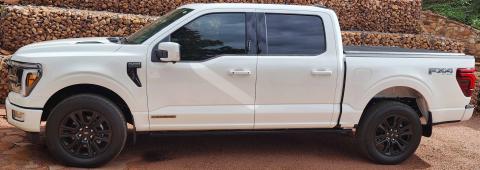 2024 F150 Platinum SCrew 3.5L PowerBoost FX4, Peragon Tonneau Cover, LineX Bed, 35% Window Tint on All Sides and Rear, Full Nose Paint Protection Film, Husky Mud Guards, Lasfit Floor Liners, VIOFO Dash Cam |
|
#4
Mon, April 6th, 2009, 01:44 AM
|
|||
|
|||
|
I do exactly that yet when I am driving my gps shows I am off my 5mph going under 40mph and off 9mph cruisng at 75mph.
 I have been messing with this for a week and tried it on each level and than did not go back to it and still not a thing is happening. I am very happy with the tuner and can not wait until i get my custom tunes! I have been messing with this for a week and tried it on each level and than did not go back to it and still not a thing is happening. I am very happy with the tuner and can not wait until i get my custom tunes!  So how do I make it stick and work for the tire size? So how do I make it stick and work for the tire size? 
|
|
#5
Mon, April 6th, 2009, 12:19 PM
|
||||
|
||||
|
Quote:
Can you give me the tire size a little more exactly than 35's? And, I have to say if you are seeing 23xx for tire size when you check it in the Custom Options, that sounds like you did not "Load Previous Settings" BEFORE you went to Tire Size. The 23xx sounds just like the "bogus" value I get when previous settings are not used. - Jack |
|
#6
Mon, April 6th, 2009, 01:34 PM
|
|||
|
|||
|
I tired just to go up 10 the tire siaze and not a difference was made at all. Speedo is reading slower by 5mph and well the gryphon reads the same as the speedo. My gps is pretty dead on had a buddy get next to me and my gps matched his speedo. Would like it from the dash as well to have it on the gryphon be a waste as I have a gps to also tell me how fast I am going. Tires are 315/70/17. I have tried loading previous settings and the 23XX number is still the same. no matter what i do does not seem to affect anything at all. Try to kick the idle down a lil nada.
__________________
2007 Supercab few mods here and there |
|
#7
Mon, April 6th, 2009, 02:41 PM
|
|||
|
|||
|
Quote:
|
|
#8
Mon, April 6th, 2009, 03:13 PM
|
|||
|
|||
|
Opps yeah got the numbers backward when typing. Took 7% off an got 2741.83. So still 2741, now just to mkae the gryphon stick to this and i will be happy.
__________________
2007 Supercab few mods here and there |
|
#9
Mon, April 6th, 2009, 03:22 PM
|
||||
|
||||
|
Almost sounds like the gryphon doesn't want to take the new inputted values?
Have you updated it with pegasus? To make sure the firm ware is up to date? Maybe a glich? Maybe a job for Super Bill! Lars
__________________
SENIOR MODERATOR--PTLA God doesn't have a Facebook but he's my friend. God doesn't have a twitter, but I follow him. |
|
#10
Mon, April 6th, 2009, 03:29 PM
|
|||
|
|||
|
Well then I was no help
 Like Lars said it might just be a job for Bill now. Like Lars said it might just be a job for Bill now.
|
| Thread Tools | |
| Display Modes | |
|
|


 Flowmaster 40, PHP Gryphon, AS 2" kit


 Linear Mode

